When you compress a video, the codec decides how the picture is packed into data. The two you'll meet most are H.264, also called AVC, and H.265, also called HEVC. Most comparisons say H.265 halves the file size and stop there.
We wanted to know how true that is for ordinary videos, so we tested it. The answer: H.265 is a real improvement, but how big depends a lot on what you're compressing, and the codec that saves the most space isn't always the one you should use.
What H.264 and H.265 are
A codec shrinks video by storing what changes between frames instead of every frame in full, and by throwing away detail your eye is unlikely to notice. Both are made by the same standards bodies, about ten years apart:
- H.264 (AVC), finalized in 2003, is the most widely supported video format there is. Phones, browsers, TVs, cars and chat apps all play it.
- H.265 (HEVC), finalized in 2013, uses larger and more flexible blocks and smarter prediction, so it needs less data for the same picture. The cost is more computing power to encode and decode, plus patent licensing that has slowed its adoption in web browsers.
Both are usually stored in an MP4 or MOV file. The file extension won't tell you which codec is inside.
How much smaller is H.265, really?
We encoded 15-second, 1080p sections of two freely licensed films from the Blender Foundation: *Tears of Steel*, a live-action film with natural film grain, and the animated *Big Buck Bunny*. Each was encoded at four quality settings with H.264 (x264), H.265 (x265) and AV1 (SVT-AV1). We then scored every result with VMAF, Netflix's open-source quality metric, which estimates how close a compressed video looks to the original, with 100 meaning identical.
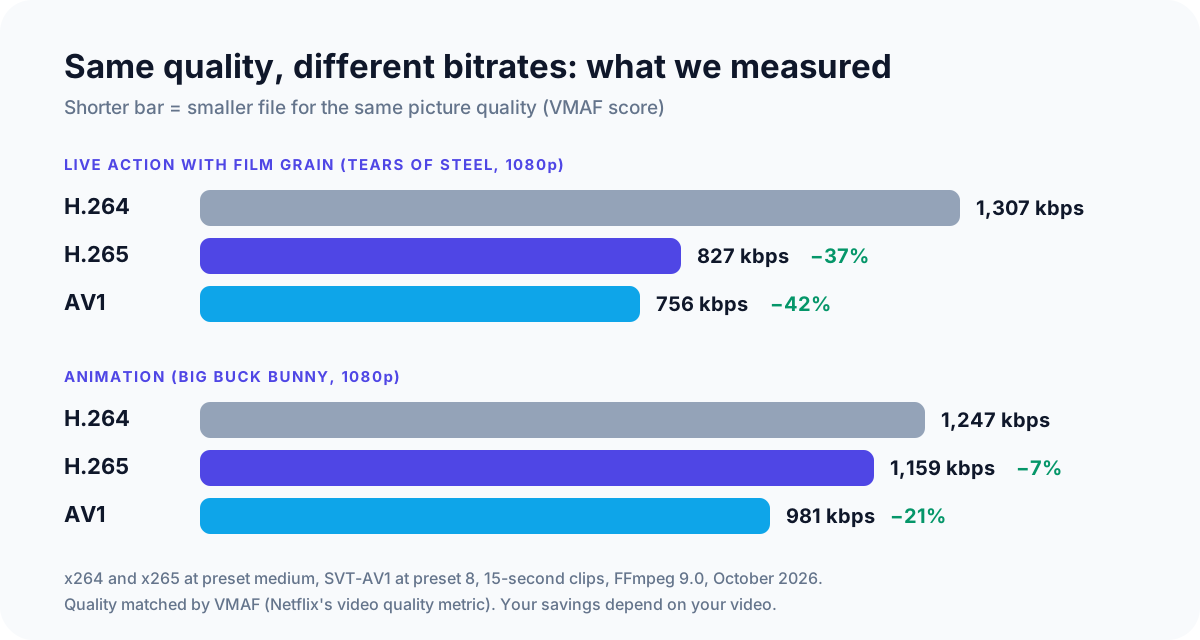
Comparing the bitrate each codec needed to reach the same VMAF score gives a fair size comparison:
| Clip (1080p) | H.264 | H.265 | AV1 |
|---|---|---|---|
| Live action, film grain | 1,307 kbps | 827 kbps (37% smaller) | 756 kbps (42% smaller) |
| Animation | 1,247 kbps | 1,159 kbps (7% smaller) | 981 kbps (21% smaller) |
Across the range of quality levels we tested, H.265 saved 34–39% on the live-action clip and 5–12% on the animation. Three things explain the gap, and they apply to your own videos:
- Fine detail and grain favor H.265. Grain, foliage, skin texture and noisy low-light footage are where its extra tools pay off. Phone and camera footage looks much more like our live-action clip than the cartoon.
- Clean, flat images leave less to save. Animation, slides and screen recordings already compress very well with H.264, so H.265 has little extra to squeeze out.
- Resolution matters. Larger frames give H.265's bigger blocks more room to work. Engineers at Warner Bros. Discovery have reported savings of roughly 25–40% at HD and 4K, with lower averages across all resolutions, which matches our live-action result.
So treat "half the size" as the best case, not the rule. For typical phone video, a third smaller is a more honest expectation.
What about encoding time?
H.265 makes the computer work harder. In our test, x265 took on average about 1.7 to 1.9 times as long as x264 at the same speed preset. On a long 4K video that's the difference between a coffee break and a lunch break.
GPU encoders change that. NVIDIA NVENC, Intel Quick Sync and AMD's encoder can all produce H.265 much faster than the processor alone, at some cost in efficiency. Our guide to compressing a video with HandBrake explains the trade-off between software and GPU encoding.
Where H.265 plays, and where it doesn't
This is where H.264 still wins. Smaller files don't help if the person you send them to sees an error.
| Where | H.264 | H.265 |
|---|---|---|
| iPhone, iPad, Mac (Safari) | Plays | Plays; iPhones record in it by default |
| Windows 10 and 11 | Plays | Often plays; some PCs need the HEVC Video Extensions from the Microsoft Store |
| Chrome, Edge, Firefox | Plays | Only if the computer's graphics hardware supports it |
| Android phones | Plays | Most recent phones |
| Older TVs, cars, game consoles | Plays | Hit and miss |
Browser support comes from Can I use, which lists Safari as fully supporting HEVC and Chrome, Edge and Firefox as partial, meaning they rely on the computer's hardware decoder. On Windows, the HEVC Video Extensions from the Microsoft Store add playback where it's missing.
Chat apps and social platforms re-compress what you upload anyway, so sending them H.265 rarely saves anything that reaches the other person.
Which one should you use?
- Sending a video to someone else: H.264. It's the only choice that's guaranteed to play, whether it goes by email, WhatsApp or Discord. For size limits, see how to compress a video for email.
- Storing your own videos: H.265. Phone videos, 4K footage and long recordings shrink noticeably, and all your own devices are likely to play it.
- Screen recordings, slides and animation: H.264 is usually enough. As our test shows, H.265 has little to add on clean content.
- Uploading to YouTube: either works. YouTube accepts both and re-encodes everything anyway, so upload whichever gives you the higher-quality file.
What about AV1?
AV1 is newer again, and it's royalty-free. It was the most efficient codec in our test, 42% smaller than H.264 on live action and 21% on animation. With the SVT-AV1 encoder at a mid-range speed setting, it was only slightly slower than x264 on one clip and faster on the other.
The catch is playback. Recent phones, browsers and graphics cards decode it, but older hardware often can't, and decoding it without hardware support is slow. AV1 is a good choice for archiving if you know your devices can play it. For sharing, it's still too early.
How to pick the codec in common tools
- iPhone camera: Settings > Camera > Formats. High Efficiency records H.265; Most Compatible records H.264. According to Apple, copying videos to a PC can convert them to H.264 unless you choose Keep Originals under Settings > Apps > Photos.
- HandBrake: the Video Encoder list on the Video tab. Pick H.264 (x264) or H.265 (x265), or a GPU option such as H.265 NVENC.
- Fast Video Compressor: the free edition saves H.264 MP4, the safest choice for sharing. Pro adds H.265 and AV1, and can encode them on your NVIDIA, Intel or AMD graphics card.

Whichever codec you choose, Fast Video Compressor shows the estimated output size before you start, so you can compare them on your own video rather than relying on averages.
Recommended DownloadDownload Fast Video Compressor - Free for Windows 10 & 11Download freeCommon questions
Is H.265 the same as HEVC?
Yes. H.265 and HEVC (High Efficiency Video Coding) are two names for the same codec. Likewise, H.264 is also called AVC (Advanced Video Coding).
Is H.265 better quality than H.264?
At the same file size, yes, usually. At the same quality, H.265 makes a smaller file. Give both the same high bitrate, though, and you won't see a difference.
Why won't my H.265 video play?
The device, browser or app doesn't support HEVC, or the computer lacks a hardware decoder. On Windows, install the HEVC Video Extensions. Otherwise, convert the video to H.264.
Should I convert my H.264 videos to H.265 to save space?
Only for videos you're keeping, and only if they're large. Every re-encode loses a little detail, and on screen recordings or animation the saving may be small. Keep the originals of anything irreplaceable.
Does converting H.265 to H.264 make the file bigger?
Usually, yes. H.264 needs more data for the same quality, so converting an H.265 phone video to H.264 without lowering the quality typically increases its size.
Sources and method
- Our test: 15-second, 1080p sections of *Tears of Steel* and *Big Buck Bunny* (© Blender Foundation, CC BY), encoded from a lossless copy with FFmpeg 9.0. Settings: x264 and x265 at preset medium (CRF 20–29 and 22–31), SVT-AV1 at preset 8 (CRF 30–45). Each result was scored with VMAF against the lossless copy, and bitrates were compared at equal VMAF. October 2026. Results from two short clips are an indication, not a universal rule.
- Can I use: HEVC/H.265 video format support
- Apple Support: HEIF and HEVC media on iPhone and iPad
- Microsoft Store: HEVC Video Extensions
- Stream: H.264 vs H.265: file size, bitrate, and when to use each (summarizing Warner Bros. Discovery's reported savings)
- YouTube Help: Supported YouTube file formats