Offline · Windows 11 & 10 · Gratis di Microsoft Store

Aplikasi Kompres Video Gratis untuk PC

video besar jadi kecil dalam beberapa klik

Perkecil ukuran video secara offline di PC Windows 11 atau 10. Lihat ukuran file baru sebelum mulai, bandingkan dengan aslinya, dan tidak ada yang diunggah.

  1. 1Masukkan video
  2. 2Pilih ukuran
  3. 3Simpan

Gratis untuk mulai · Bisa offline · Tanpa akun

Hingga 90% lebih kecilTergantung sumber dan pengaturan
Hingga 3× lebih cepatDengan akselerasi GPU (Pro)
0 GB diunggahSemua diproses di PC Anda
4.80 / 5104 penilaian di Microsoft Store
Inilah aplikasinya

Aplikasi kompres video untuk PC, dalam satu layar.

Tanpa menu yang membingungkan. Inilah yang Anda lihat saat membuka Fast Video Compressor di Windows 11 atau 10.

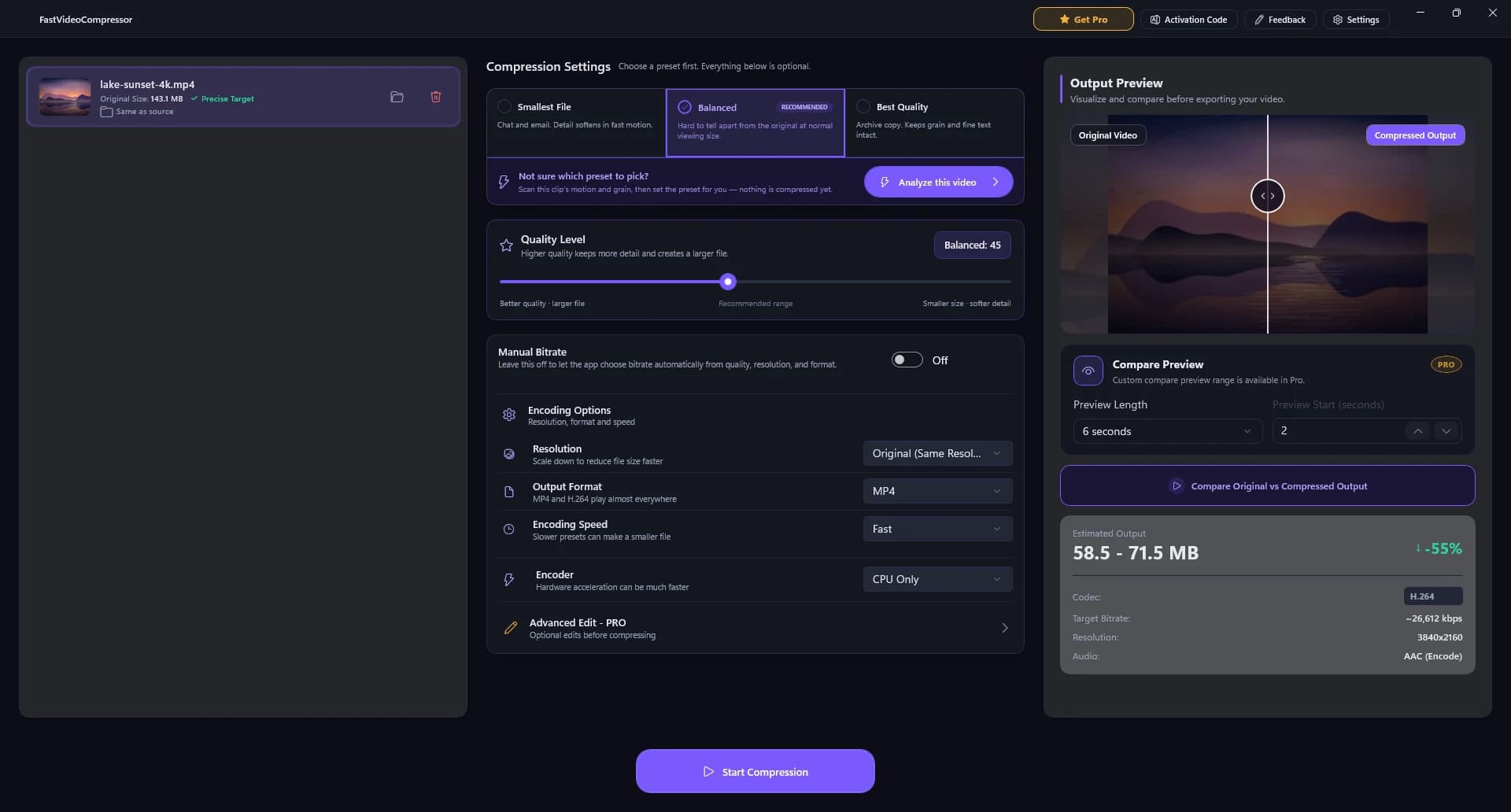
Jendela Fast Video Compressor: video 4K ditambahkan di kiri, preset dan slider kualitas di tengah, pratinjau dan perkiraan ukuran di kanan, serta tombol Start Compression di bawah.
  1. Video Anda

    Masukkan videonya. Anda melihat nama file dan ukuran aslinya.

  2. Pilih preset

    File terkecil, Seimbang (disarankan) atau Kualitas terbaik.

  3. Tingkat kualitas

    Atur dengan satu slider jika ingin kontrol lebih.

  4. Pratinjau dan perkiraan ukuran

    Bandingkan dengan aslinya dan lihat ukuran baru sebelum mulai.

  5. Start Compression

    Satu klik. Salinan hasil kompres disimpan di samping file asli.

Fitur utama

Software kompres video yang mudah dipakai.

Kebanyakan software kompres video membuat Anda harus paham codec dan bitrate. Fast Video Compressor memutuskannya untuk Anda, jadi Anda bisa memperkecil video tanpa harus jadi ahli.

Kompresi pintar

Tidak ada pengaturan yang membingungkan

Kompresi pintar menganalisis setiap video dan memilih keseimbangan ukuran dan kualitas yang tepat. Tanpa codec, tanpa bitrate, tanpa tebak-tebakan.

  • Satu pilihan: terkecil, seimbang atau kualitas terbaik
  • Disesuaikan per video, bukan satu preset untuk semua
Pratinjau sebelum ekspor

Lihat hasilnya sebelum memutuskan

Bandingkan video asli dan hasil kompres secara berdampingan, dan lihat perkiraan ukuran file sebelum ekspor dimulai.

  • Pratinjau sebelum dan sesudah berdampingan
  • Perkiraan ukuran hasil sejak awal
Hasil jernih

File jauh lebih kecil, tetap tajam

Perkecil ukuran file hingga 90% dengan wajah, teks di layar dan gerakan tetap jelas. Hasil tergantung video sumber dan ukuran yang dipilih.

  • Siap untuk aplikasi chat, email dan unggahan
  • Bisa mempertahankan resolusi asli
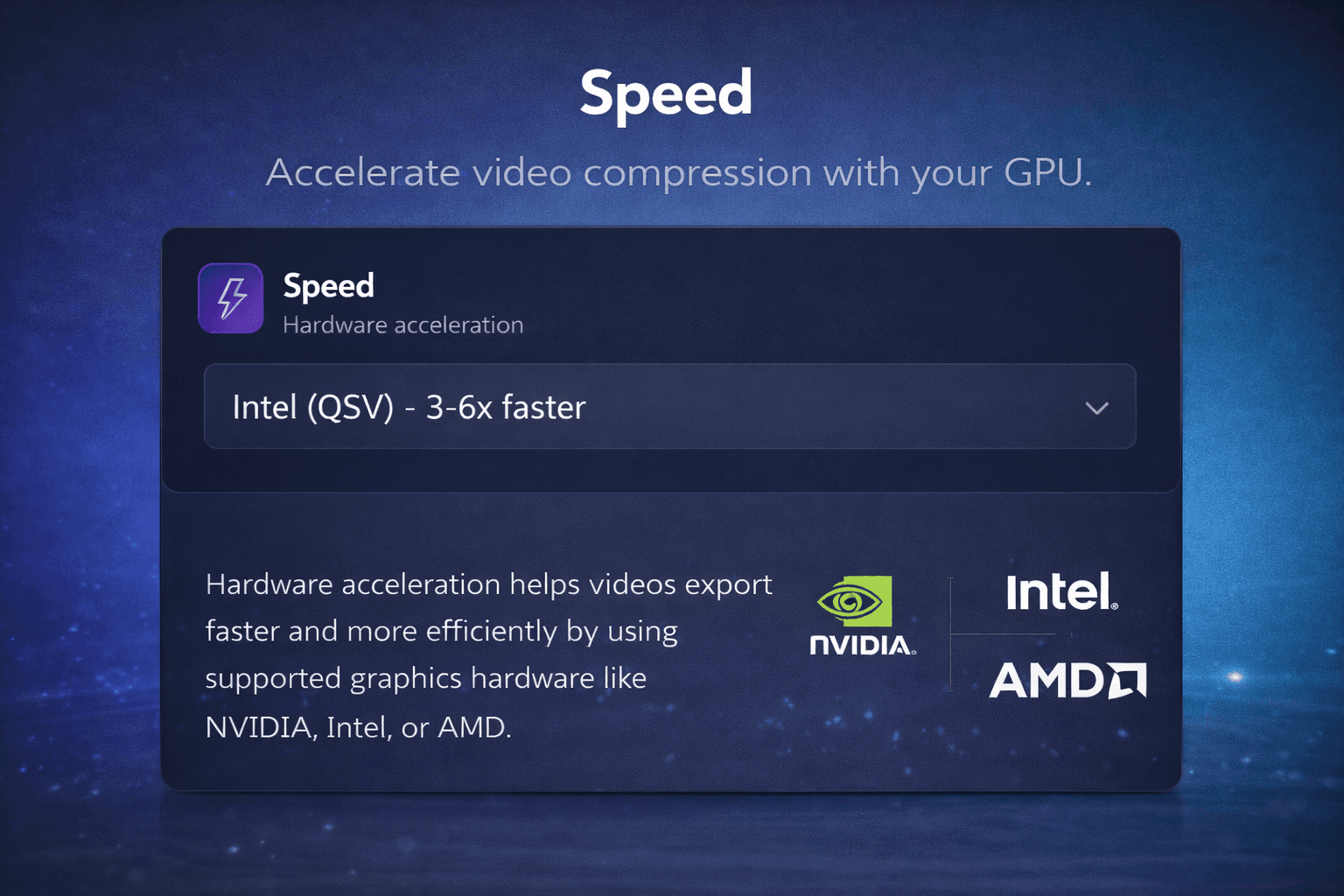
Akselerasi GPU · Pro

Kompres cepat: video 4K panjang dalam hitungan menit

Pro memakai kartu grafis Intel, NVIDIA atau AMD Anda untuk mengompres hingga 3× lebih cepat, jadi rekaman besar tidak lagi menyita waktu Anda.

  • Mendukung Intel Quick Sync, NVIDIA NVENC dan AMD
  • Paling terasa untuk rekaman panjang dan video 4K
Panel akselerasi GPU yang menunjukkan dukungan Intel, NVIDIA dan AMD.
Semua sudah termasuk

Semua fitur aplikasi kompres video, gratis dan Pro.

Pro
3×

Lebih cepat dengan akselerasi GPU

Encoder Intel Quick Sync, NVIDIA NVENC dan AMD mengerjakan bagian beratnya.

IntelNVIDIAAMD

Kompresi pintar berbasis AI

Memilih keseimbangan ukuran dan kualitas terbaik untuk setiap video.

Perkiraan ukuran

Lihat ukuran file akhir sebelum mengompres.

Pratinjau dulu

Periksa hasilnya sebelum ekspor akhir.

Pro

Antrean batch

Antrekan banyak video dan kompres sekaligus.

100% lokal

Video Anda tidak pernah keluar dari PC.

File besar

Hingga 2 GB gratis. Tanpa batas dengan Pro.

Pro

Semua format

MP4 gratis. MKV, AVI, MOV, WMV, WEBM, M4V dengan Pro.

Kompres video offline vs online

Kompres video offline. Tanpa upload.

Aplikasi Windows asli memperkecil video tanpa mengirim satu byte pun ke cloud - praktis untuk batas Discord, lampiran email dan arsip besar.

Kompresor online
  • Harus upload seluruh file dulu, lalu menunggu lagi untuk download
  • Batas ukuran file dan batas harian
  • Video Anda tersimpan di server orang lain
  • Berhenti bekerja saat koneksi putus
Fast Video Compressor
  • Langsung mulai - tidak perlu upload
  • File besar tidak masalah - hingga 2 GB gratis, tanpa batas dengan Pro
  • Video Anda tidak pernah keluar dari PC
  • Bekerja sepenuhnya offline di Windows 11 dan 10
Download gratis untuk Windows
Ulasan

Disukai orang yang mengompres video setiap hari.

4.80
dari 5
104 penilaiandi Microsoft Store
★★★★★

so fast, no fuss

it does exactly what you need it to and its clear
DjUlasan Microsoft Store
★★★★★

The best video compressor I've ever used

I've used some video compressor apps, most of them doesn't look very Windows and some of them don't work properly (especially to large videos), this one doesn't have any issues I faced. It's also not a web app, it's an actual native app.
ArturoUlasan Microsoft Store
★★★★★

Easy to use

The layout and the options of the software is easy to understand and use
JonathanUlasan Microsoft Store
★★★★★

Excellent program

Gets the job done fast!
ScruffyUlasan Microsoft Store
★★★★★

great app! <3

it's very fast and it helps me a lot!
RussellUlasan Microsoft Store
★★★★★

Can set target file size

Very good, i can set the target file size.
AndyUlasan Microsoft Store
★★★★★

Impeccable!!!

Simple!! Facile!! Efficace!!!
Jean-LouisUlasan Microsoft Store
★★★★★

Easy to use

I like how easy it is to use and keeps good quality while reducing the video's file-size significantly. If it's had a one-time-purchase option (for a lifetime license) then I'd probably get it. As subscription only, I can't justify the ongoing expense (I can still use the free option or Handbrake software).
MistyUlasan Microsoft Store
★★★★★

very good program

does everything i need, very useful and easy to use
MikeUlasan Microsoft Store
★★★★★

très bon boulot et garde bien les ratio

très bon boulot et garde bien les ratio
MaciaUlasan Microsoft Store
★★★★★

love it

gets the job done albeit since its free you can only do it one at a time
FGUlasan Microsoft Store
★★★★★

school

I had to compress my files for EDtpa state teacher profile. It was quick and easy to figure out
dimaondUlasan Microsoft Store
★★★★★

It works!

It actually works. Is worth the money. Only thing it needs is the ability to have multiple videos.
GabrielUlasan Microsoft Store
★★★★★

its pretty good

fast and simple
AlecUlasan Microsoft Store
★★★★★

does a great job

Easy to use
TerryUlasan Microsoft Store
★★★★★

Great free compression tool

Have used this to compress videos for uploading to a website. This tool compresses quickly with minimal loss in quality. The GPU Acceleration is behind a paywall, but for smaller projects, the free CPU compression is great.
NickUlasan Microsoft Store
★★★★★

THE BEST

This is best I have seen on here. Very swift and fast.
AnthonyUlasan Microsoft Store
★★★★★

Incredibly fast

Only faults, it only has a few languages available and it uses American English instead of English.
BenjaminUlasan Microsoft Store
★★★★★

Quick and Easy Compressor

I really enjoyed my experience on Fast Video Compressor. I think it's an efficient tool for compressing videos quickly! To me it's more like a life savior. Thankyou
UmaimaUlasan Microsoft Store
★★★★★

Works Very Well For a Free App

Have been using to compress video files to fit upload size limits and am achieving significant reduction without quality loss
AlexanderUlasan Microsoft Store
★★★★★

My ideal compressor!

My ideal compressor!
真子Ulasan Microsoft Store
★★★★★

free & easy

free & easy
DavidUlasan Microsoft Store
★★★★★

ótimo app

merece 5 estrela, amei.
Microsoft Store userUlasan Microsoft Store
★★★★★

Genial

Funciona de maravilla
Gabriel P.Ulasan Microsoft Store
★★★★★

excellent

I recently used this video compressor and I'm genuinely impressed with the results. The compression quality is outstanding - videos retain clarity, sharpness, and color even after reducing file size significantly. It works fast, supports multiple formats, and makes sharing large files extremely convenient.
vaishnaviUlasan Microsoft Store
★★★★★

Excellent and Super Fast!

Windows Fast Video Compressor is amazing - it reduces file size quickly without losing quality. Super easy to use, clean interface, and works perfectly even with large videos. Exactly what I needed for fast compression. Highly recommend!
UdayUlasan Microsoft Store
★★★★★

Great compressor

What I love most is the simplicity - just select, compress, and done. No confusing settings or hidden steps. It's exactly what most users need: speed and reliability. Five stars all the way.
Microsoft Store userUlasan Microsoft Store
★★★★★

Impressive Speed and Quality Balance

Fast Video Compressor does exactly what its name promises. It delivers excellent compression speeds while maintaining crisp video quality. The user interface is minimal yet powerful, making it ideal for both beginners and professionals. I've tested it with multiple HD and 4K videos, and the results were consistently great - fast processing, stable performance, and no unnecessary ads or pop-ups. This app has become an essential part of my daily workflow. Highly recommend it for anyone who values efficiency and simplicity.
Udit KumarUlasan Microsoft Store
★★★★★

Excellent and Super Fast!

I've tried several video compressors before, but this one really stands out. The interface is clean, simple, and easy to use - no unnecessary clutter. It compresses large videos quickly without losing much quality, and the output size is perfect for sharing or uploading online. I also love that it supports multiple formats and works smoothly even on my mid-range laptop. Definitely a must-have tool for anyone dealing with big video files. Highly recommended!
VaraUlasan Microsoft Store

Berdasarkan penilaian Microsoft Store, termasuk 41 ulasan tertulis antara 6 Oktober 2025 dan 11 Oktober 2026. Ulasan ditampilkan dalam bahasa aslinya.

Harga

Aplikasi kompres video gratis. Pro saat butuh lebih.

Mulai dengan edisi gratis dari Microsoft Store, lalu upgrade ke Pro di dalam aplikasi - tanpa akun di situs web.

Gratis

Edisi gratis

$0selamanya

Dari Microsoft Store

  • Video MP4 hingga 2 GB
  • Satu video setiap kali
  • Sepenuhnya offline, tanpa upload
  • Tanpa akun
Download gratis
Hemat 64% dibanding bulananPro

1 Tahun

$34.99/ tahun

$2.92/bln, ditagih tahunan

  • Semua fitur Pro
  • Satu pembayaran untuk setahun penuh
Aktifkan 1 Tahun
Pro

Bulanan

$7.99/ bulan

$7.99/bln, ditagih bulanan

  • Semua fitur Pro
  • Batalkan kapan saja di Microsoft Store
Aktifkan Bulanan
Setiap paket Pro menambahkan
  • Semua format (MKV, AVI, MOV, WMV, WEBM, M4V)
  • Tanpa batas 2 GB
  • Akselerasi GPU
  • Kompresi batch

Harga dari Microsoft Store; Store menampilkan harga pasti untuk negara Anda saat checkout, dan pajak mungkin berlaku.

Download gratis

Download aplikasi kompres video untuk PC secara gratis.

Fast Video Compressor adalah software kompres video gratis untuk Windows 11 dan 10, dipasang dengan aman dari Microsoft Store. Begini cara mendapatkannya dan kebutuhannya.

Cara memasangnya di Windows

  1. Klik Download

    Halaman Fast Video Compressor terbuka di aplikasi Microsoft Store.

  2. Klik Dapatkan / Instal

    Windows mengunduh dan memasangnya - tanpa .exe, tanpa aplikasi tambahan.

  3. Buka dari Start

    Masukkan video dan kompres. Pembaruan terpasang otomatis.

Download gratis untuk Windows

Detail aplikasi

Aplikasi
Fast Video Compressor
Versi
5.0.6
Berjalan di
Windows 11 dan Windows 10
Arsitektur
x64, x86 dan ARM64
Edisi gratis
Video MP4 hingga 2 GB, satu per satu
Upgrade Pro
Semua format, tanpa batas 2 GB, kecepatan GPU, batch
Harga
Download gratis (Pro opsional)
Internet
Hanya untuk instalasi - kompresi berjalan offline
Pengembang
SATYAVARAPRASAD
Nama sebelumnya
SVP Video Compressor
FAQ

Aplikasi kompres video untuk PC: tanya jawab.

Apa itu Fast Video Compressor untuk Windows?

Fast Video Compressor adalah aplikasi kompres video offline untuk Windows 10 dan Windows 11 yang memperkecil file video besar tanpa mengunggahnya ke cloud.

Bagaimana cara kompres video MP4 secara offline di Windows?

Masukkan MP4 ke Fast Video Compressor, pilih preset (Smallest File, Balanced atau Best Quality), periksa perkiraan ukuran dan pratinjau berdampingan, lalu klik Start Compression. Semua berjalan di PC Anda - tidak ada yang diunggah.

Seberapa kecil ukuran video bisa dikompres?

Banyak video bisa diperkecil hingga 90%, tergantung kualitas sumber, codec, resolusi dan pengaturan yang dipilih.

Bisakah kompres video tanpa mengurangi kualitas?

Setiap kompresi membuang sebagian data, tetapi preset Balanced diatur agar hasilnya sulit dibedakan dari aslinya pada ukuran tonton normal. Dalam uji kami, klip 4K 143 MB menjadi 65 MB dan tetap 4K. Gunakan pratinjau berdampingan untuk memeriksa sebelum ekspor.

Bisakah kompres banyak video sekaligus di versi Pro?

Bisa. Pro menyertakan kompresi batch: antrekan beberapa file dan proses sekaligus di PC Windows Anda.

Apakah Fast Video Compressor Pro mendukung akselerasi GPU?

Ya. Versi Pro menyertakan akselerasi GPU pada perangkat Intel, NVIDIA dan AMD yang kompatibel untuk kompresi lebih cepat.

Format video apa saja yang didukung?

Edisi gratis mengompres file MP4. Pro menambahkan MKV, AVI, MOV, WMV, WEBM dan M4V.

Apakah Fast Video Compressor gratis?

Ya. Edisi gratis dari Microsoft Store mengompres video MP4 hingga 2 GB, satu per satu, tanpa akun. Pro adalah upgrade opsional di dalam aplikasi yang menambahkan semua format, menghapus batas 2 GB, serta menambahkan akselerasi GPU dan kompresi batch.

Bagaimana cara download aplikasi kompres video untuk PC?

Klik Download untuk Windows di halaman ini. Fast Video Compressor terbuka di Microsoft Store; klik Dapatkan atau Instal dan Windows menyiapkannya - tidak ada .exe yang perlu dijalankan. Berjalan di Windows 11 dan 10 (x64, x86 dan ARM64).

Bagaimana cara kompres video untuk WhatsApp, Discord atau email?

Tambahkan video, pilih Smallest File dan perhatikan perkiraan ukuran sampai di bawah batas: 16 MB untuk video WhatsApp, 10 MB untuk akun Discord gratis, sekitar 20 MB untuk email. Untuk ukuran yang tepat, gunakan opsi Manual Bitrate.

Apakah ini alternatif HandBrake yang bagus?

Ya, jika Anda ingin kompresi yang sederhana. HandBrake punya jauh lebih banyak pengaturan codec; Fast Video Compressor memberi tiga preset, perkiraan ukuran langsung dan pratinjau berdampingan, jadi Anda mendapat file lebih kecil tanpa mempelajari pengaturan.

Apakah ini aplikasi yang sama dengan SVP Video Compressor?

Ya. Fast Video Compressor sebelumnya bernama SVP Video Compressor. Aplikasinya sama, dari pengembang yang sama, kini diperbarui dan berganti nama.

Apakah aman untuk diunduh?

Fast Video Compressor didistribusikan melalui Microsoft Store, jadi lolos sertifikasi Store, dan Windows memasang serta memperbaruinya untuk Anda. Aplikasi berjalan offline dan tidak pernah mengunggah video Anda.

Apakah ada batas ukuran file?

Edisi gratis menangani video hingga 2 GB per file. Pro menghapus batas itu. Tidak pernah ada batas upload, karena semuanya berjalan di PC Anda.

Download gratis

Perkecil video Anda berikutnya hari ini.

Mulai gratis dari Microsoft Store. Upgrade ke Pro kapan saja untuk semua format, tanpa batas ukuran, kecepatan GPU dan antrean batch.

Download untuk Windows

Windows 11 & 10 · Microsoft Store · Bisa offline

Product Chat

Product Assistant

Name, email, and privacy consent required once.

Hello. Please share your name and email, then accept the privacy notice to continue.

Privacy notice: We collect your name, email, and live chat messages for support and follow-up, plus a hashed IP and user-agent for abuse prevention. We do not sell your personal data. Read policy.