
スマート圧縮
難しい設定は不要
スマート圧縮が動画ごとに分析し、サイズと画質のちょうどよいバランスを選びます。コーデックもビットレートも当て推量も不要です。
- 選ぶのは 1 つだけ: 最小、バランス、最高画質
- すべてに同じ設定ではなく動画ごとに最適化
大きな動画を数クリックで小さく
Windows 11/10 の PC 上で、オフラインのまま動画の容量を小さくできます。始める前に新しいファイルサイズを確認し、元の動画と比較。何もアップロードされません。
無料で始められる · オフラインで動作 · アカウント不要
メニューを探し回る必要はありません。Windows 11/10 で Fast Video Compressor を開くと、この画面が表示されます。
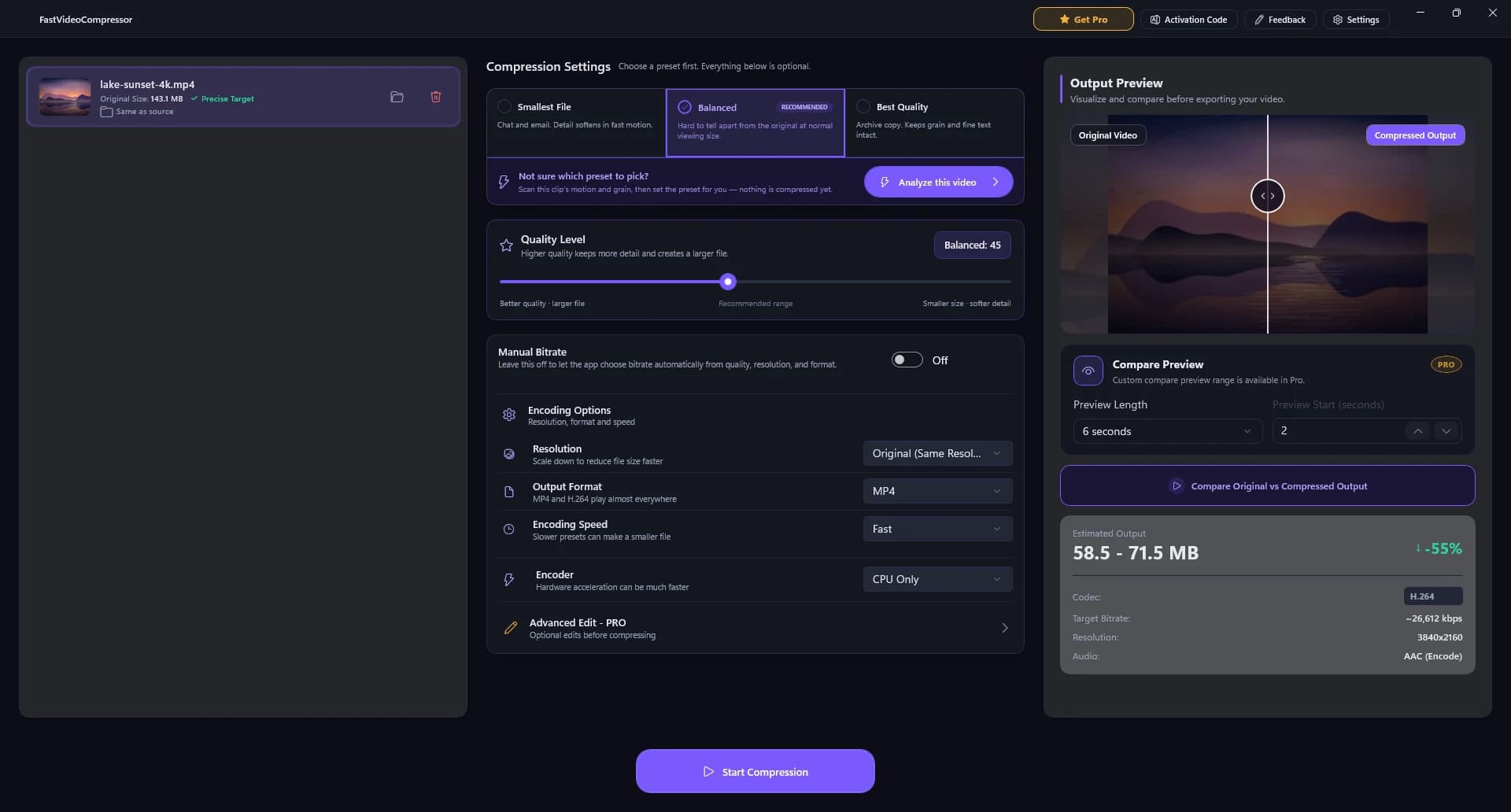
ドロップするだけ。ファイル名と元のサイズが表示されます。
最小サイズ、バランス (おすすめ)、最高画質から選択。
細かく調整したいときはスライダー 1 本で。
元の動画と比べ、始める前に新しいサイズを確認。
ワンクリック。圧縮したコピーは元の動画の隣に保存されます。
多くの動画圧縮ソフトはコーデックやビットレートの知識が必要です。Fast Video Compressor はそれを代わりに判断するので、専門知識なしで動画の容量を減らせます。
スマート圧縮が動画ごとに分析し、サイズと画質のちょうどよいバランスを選びます。コーデックもビットレートも当て推量も不要です。
元の動画と圧縮版を左右に並べて比較し、書き出しを始める前に予想ファイルサイズを確認できます。
顔や画面上の文字、動きを鮮明に保ったまま、ファイルサイズを最大 90% 削減。結果は元の動画と選んだサイズによって異なります。
Pro は Intel、NVIDIA、AMD のグラフィックスを使って最大 3 倍速く圧縮。大きな録画に午後を取られることはもうありません。
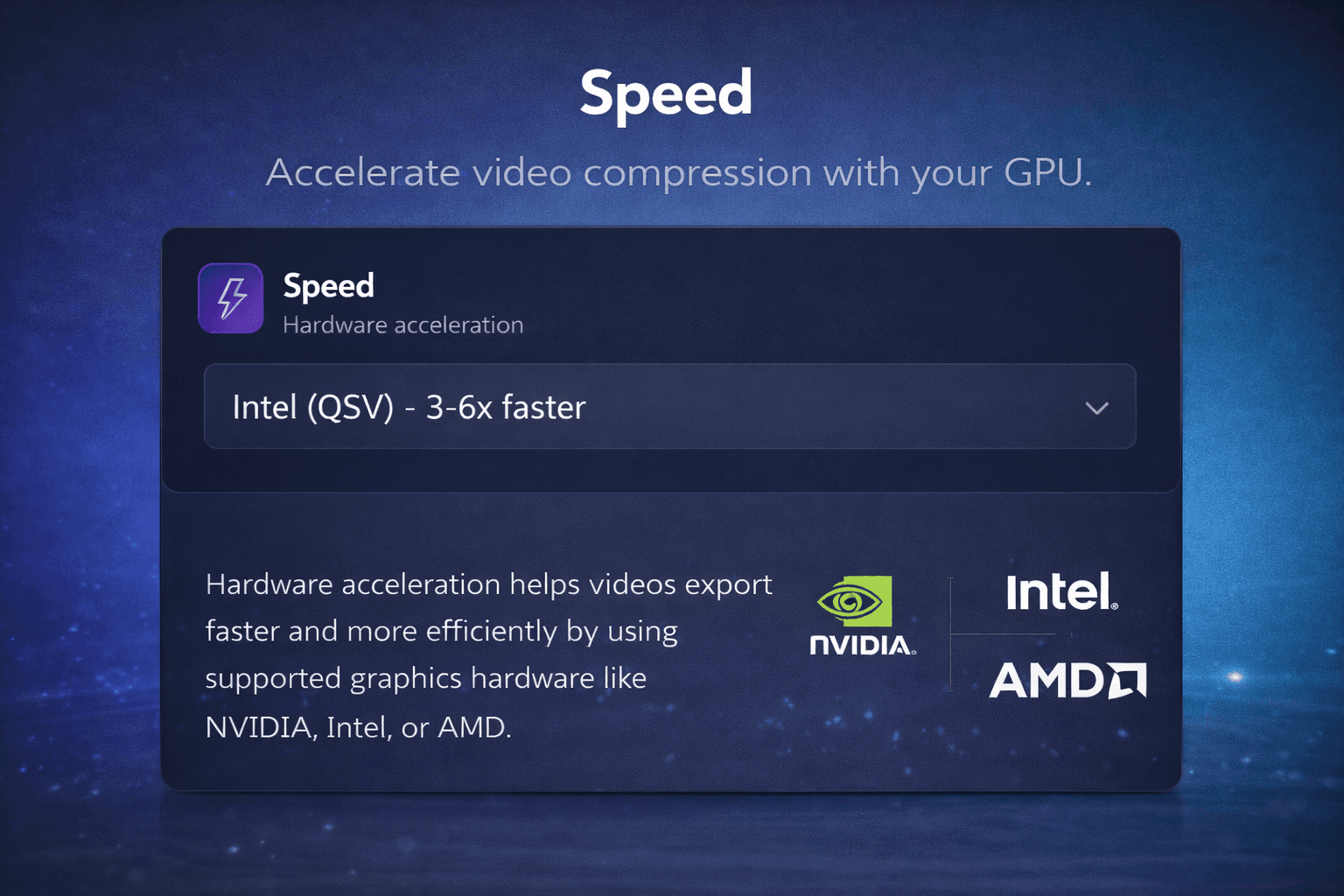
Intel Quick Sync、NVIDIA NVENC、AMD のエンコーダーが重い処理を担当します。
動画ごとにサイズと画質の最適なバランスを選択します。
圧縮する前に仕上がりサイズを確認。
最終書き出しの前に結果をチェック。
複数の動画を並べてまとめて圧縮。
動画が PC の外に出ることはありません。
無料版は 2 GB まで。Pro は無制限。
無料版は MP4。Pro は MKV、AVI、MOV、WMV、WEBM、M4V にも対応。
Windows ネイティブのアプリなので、クラウドに 1 バイトも送らずに動画を小さくできます。Discord の容量制限、メール添付、大きなアーカイブに便利です。
so fast, no fuss
it does exactly what you need it to and its clear
The best video compressor I've ever used
I've used some video compressor apps, most of them doesn't look very Windows and some of them don't work properly (especially to large videos), this one doesn't have any issues I faced. It's also not a web app, it's an actual native app.
Easy to use
The layout and the options of the software is easy to understand and use
Excellent program
Gets the job done fast!
great app! <3
it's very fast and it helps me a lot!
Can set target file size
Very good, i can set the target file size.
Impeccable!!!
Simple!! Facile!! Efficace!!!
Easy to use
I like how easy it is to use and keeps good quality while reducing the video's file-size significantly. If it's had a one-time-purchase option (for a lifetime license) then I'd probably get it. As subscription only, I can't justify the ongoing expense (I can still use the free option or Handbrake software).
very good program
does everything i need, very useful and easy to use
très bon boulot et garde bien les ratio
très bon boulot et garde bien les ratio
love it
gets the job done albeit since its free you can only do it one at a time
school
I had to compress my files for EDtpa state teacher profile. It was quick and easy to figure out
It works!
It actually works. Is worth the money. Only thing it needs is the ability to have multiple videos.
its pretty good
fast and simple
does a great job
Easy to use
Great free compression tool
Have used this to compress videos for uploading to a website. This tool compresses quickly with minimal loss in quality. The GPU Acceleration is behind a paywall, but for smaller projects, the free CPU compression is great.
THE BEST
This is best I have seen on here. Very swift and fast.
Incredibly fast
Only faults, it only has a few languages available and it uses American English instead of English.
Quick and Easy Compressor
I really enjoyed my experience on Fast Video Compressor. I think it's an efficient tool for compressing videos quickly! To me it's more like a life savior. Thankyou
Works Very Well For a Free App
Have been using to compress video files to fit upload size limits and am achieving significant reduction without quality loss
My ideal compressor!
My ideal compressor!
free & easy
free & easy
ótimo app
merece 5 estrela, amei.
Genial
Funciona de maravilla
excellent
I recently used this video compressor and I'm genuinely impressed with the results. The compression quality is outstanding - videos retain clarity, sharpness, and color even after reducing file size significantly. It works fast, supports multiple formats, and makes sharing large files extremely convenient.
Excellent and Super Fast!
Windows Fast Video Compressor is amazing - it reduces file size quickly without losing quality. Super easy to use, clean interface, and works perfectly even with large videos. Exactly what I needed for fast compression. Highly recommend!
Great compressor
What I love most is the simplicity - just select, compress, and done. No confusing settings or hidden steps. It's exactly what most users need: speed and reliability. Five stars all the way.
Impressive Speed and Quality Balance
Fast Video Compressor does exactly what its name promises. It delivers excellent compression speeds while maintaining crisp video quality. The user interface is minimal yet powerful, making it ideal for both beginners and professionals. I've tested it with multiple HD and 4K videos, and the results were consistently great - fast processing, stable performance, and no unnecessary ads or pop-ups. This app has become an essential part of my daily workflow. Highly recommend it for anyone who values efficiency and simplicity.
Excellent and Super Fast!
I've tried several video compressors before, but this one really stands out. The interface is clean, simple, and easy to use - no unnecessary clutter. It compresses large videos quickly without losing much quality, and the output size is perfect for sharing or uploading online. I also love that it supports multiple formats and works smoothly even on my mid-range laptop. Definitely a must-have tool for anyone dealing with big video files. Highly recommended!
Microsoft Store の評価に基づきます (2025 年 10 月 6 日から 2026 年 10 月 11 日までに投稿された 41 件の文章レビューを含む)。 レビューは書かれた言語のまま表示しています。
Microsoft Store の無料版から始めて、アプリ内で Pro にアップグレード。Web サイトのアカウントは不要です。
$0ずっと無料
Microsoft Store から
$34.99/ 年
$2.92/月相当、年 1 回請求
$79.991 回のみ
$119.9933% OFF
1 回のお支払い
$7.99/ 月
$7.99/月、毎月請求
価格は Microsoft Store の価格です。お住まいの国の正確な価格は購入時に Store に表示され、税金がかかる場合があります。
Fast Video Compressor は Windows 11/10 向けの無料動画圧縮ソフトで、Microsoft Store から安全にインストールできます。入手方法と動作環境はこちら。
Microsoft Store アプリで Fast Video Compressor のページが開きます。
Windows がダウンロードしてインストールします。.exe の実行も、余計なソフトの同梱もありません。
動画を追加して圧縮するだけ。更新は自動でインストールされます。
Fast Video Compressor は Windows 10 と Windows 11 向けのオフライン動画圧縮ソフトです。大きな動画ファイルをクラウドにアップロードせずに小さくできます。
MP4 を Fast Video Compressor にドロップし、プリセット (Smallest File、Balanced、Best Quality) を選び、予想サイズと左右比較のプレビューを確認して Start Compression をクリックします。すべて PC 上で処理され、何もアップロードされません。
元の画質、コーデック、解像度、選んだ設定によりますが、多くの動画は最大 90% 小さくできます。
圧縮では必ず一部のデータが削られますが、Balanced プリセットは通常の視聴サイズで元の動画と見分けにくい仕上がりになるよう調整されています。テストでは 143 MB の 4K 動画が 4K のまま 65 MB になりました。書き出し前に左右比較のプレビューで確認できます。
はい。Pro には一括圧縮があり、複数のファイルをキューに入れて Windows PC でまとめて処理できます。
はい。Pro 版は対応する Intel、NVIDIA、AMD のハードウェアで GPU アクセラレーションを使い、より速く圧縮します。
無料版は MP4 ファイルを圧縮できます。Pro では MKV、AVI、MOV、WMV、WEBM、M4V が追加されます。
はい。Microsoft Store の無料版は、2 GB までの MP4 動画を一度に 1 本、アカウント不要で圧縮できます。Pro はアプリ内の任意のアップグレードで、すべての形式に対応し、2 GB 制限をなくし、GPU アクセラレーションと一括圧縮を追加します。
このページの「Windows 版をダウンロード」をクリックします。Microsoft Store で Fast Video Compressor が開くので、「入手」または「インストール」をクリックすれば Windows が設定します。.exe を実行する必要はありません。Windows 11/10 (x64、x86、ARM64) で動作します。
動画を追加して Smallest File を選び、予想サイズが上限を下回るまで確認します。WhatsApp の動画は 16 MB、Discord の無料アカウントは 10 MB、メールは約 20 MB が目安です。正確なサイズにしたい場合は Manual Bitrate オプションを使います。
シンプルに圧縮したいならおすすめです。HandBrake ははるかに多くのコーデック設定を備えていますが、Fast Video Compressor は 3 つのプリセット、リアルタイムのサイズ予測、左右比較のプレビューで、設定を覚えずにファイルを小さくできます。
はい。Fast Video Compressor は以前 SVP Video Compressor という名前でした。同じ開発者による同じアプリで、アップデートと名称変更が行われました。
Fast Video Compressor は Microsoft Store で配布されているため、Store の認定を通過しており、インストールと更新は Windows が行います。オフラインで動作し、動画をアップロードすることはありません。
無料版は 1 本あたり 2 GB までの動画を扱えます。Pro では上限がなくなります。すべて PC 上で処理されるため、アップロードの上限はありません。